PowerShell: NetApp LUN monitoring with a PRTG custom sensor
When a LUN goes offline, bad things tend to happen on the host using it. It is good to know sooner rather than later if that happens. I was looking for a way to do this and what made the most sense was using PowerShell and PRTG.
Requirements
- PRTG installation (you can get it free for up to 100 sensors!)
- While you don't NEED PRTG that is how this script reports back. You'll need to change what the actions are for offline LUNs if you want to do other things.
- ONTap PowerShell toolkit
- This will need to be installed where you are using the script.
- A user account on the NetApp(s) that the script can leverage.
Setup
You'll need to setup:
- The module full path for the ONTap toolkit (if different).
- The password setup section that is commented out.
- The username ($user) you are going to use to connect to the NetApp(s).
- The array ($netAppControllers) of your controllers. For 7-mode simply include the controller name, for CDOT add -c after the name so the script knows which is which.
- The $exclude variable file path. (It is best to set this up even if it is a blank text file).
The functions and switch
The code lets you run the script specifying "all" controllers (which will use the array defined at the beginning of the script), or a controller of your choice.
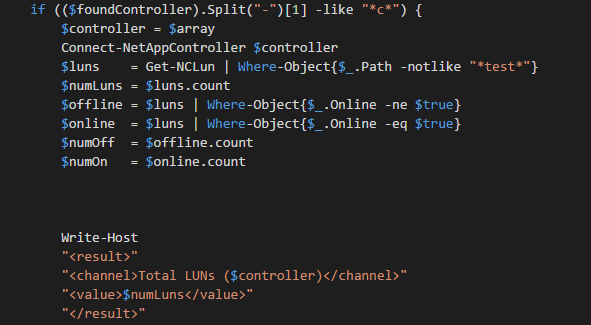
The function Display-PRTGText takes the $netAppObject object that is built below in the switch option luncheck. It first displays the PRTG header, the LUN information, and finally the PRTG footer.
The switch looks for the action you'd like to take. Right now there is only one, "luncheck". You can add more for different sensor types to check different things based on what you pass to -action.
Examples
To test the script, run it as follows:
.\Lun-Check.ps1 -Controller yourcontroller-c -action luncheck
The above code will execute and if all goes well it will return results with opening and closing <prtg> tags.
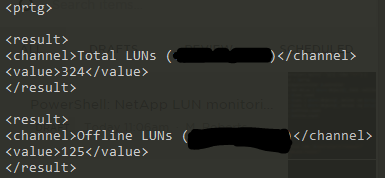
If there are any offline, they will be returned into the PRTG sensor via the <text> tag.
Exclusions
You can exclude certain LUNs from being checked. If you have decommissioned a server or are testing anything that involves setting a LUN's state to be offline this can be handy. Add entries to exclude.txt line by line. You can include either the full LUN path, or anything in the path name with wildcards around it. Please note that there is also a line that omits any LUN with "test" in the name. To change this, remove that if line.
Examples:
- /vol/finance1/lun1
- *finance*
The first example will omit just that one LUN, whereas the second example will omit any LUN with finance in the path. Any exclusions you do add will be noted in the sensor's message as text if no LUNs are currently offline.
Once you have verified you received the results from the script as needed, we can now perform the sensor setup in PRTG.
PRTG Setup
You'll want to perform the following steps in PRTG:
- Ensure you have the script in your EXEXML custom sensor folder. Example: "D:\PRTG Network Monitor\Custom Sensors\EXEXML\lun-check.ps1".
- Create an "EXE/Script Advanced" sensor on a device of your choice.
- Select the lun-check.ps1 script in the drop down.
- Set the following parameters: -controller all -action luncheck
- Modify the timeout of the script to 180 seconds.
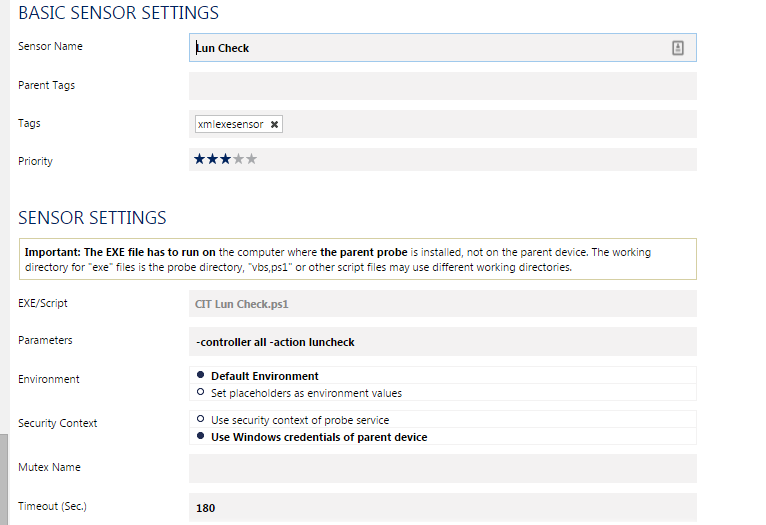
If you do not want to use the array with all the NetApp(s) change 'all' to the name of a controller. If it is a CDOT controller, be sure to add -c to the name.
You should now see channels for total and offline LUNs.
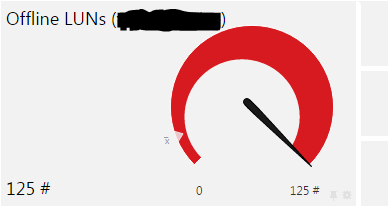
I have it setup to show the sensor as down if there are any LUNs offline. To do this, be sure to change the channel limits accordingly. It will return the path of the LUN and the VServer it is on (CDOT) or just the path for 7-Mode. This is displayed in the sensor's message as text.

And finally, you'll want to tweak the notification settings of the sensor if for some reason you want it different than the parent's settings.
Full Code
I wrote this to fill a need rather quickly. For error handling, the PRTG sensor itself does a good job at telling you why and where the script broke. As for variable renaming and cleanup, that is something I am always striving to do.
I hope you found this helpful, and as always feedback is appreciated!
-Ginger Ninja
Comments
No comments yet. Be the first!