PowerShell Quick Tip: Using ValidateSet
PowerShell Quick Tip: Using ValidateSet
Why Use ValidateSet?
ValidateSet is part of advanced parameters. It allows you to constrain the input of the parameter to a set of values. It also will autocomplete those options for you as you tab through them!
This can really come in handy if you only want to accept a specific set of options as input to the parameter. I've found it useful in the following scenarios:
- Scripts that work with AD, and you'd like a specific set of options for a given parameters
- Scripts that work with an API, and only a specific set of values are accepted
- Scripts that are used in web parsing where you'd like to constrain the options for a specific parameter
- You want to reduce the amount of logic in your script, and offload it to parameter validation (added bonus: error generation for you)
Using ValidateSet
Using ValidateSet is easy! You just add the following line above your parameter:
The above example will ensure the input to the parameter we create is either Green, Blue, or Red.
Here is a simple function I put together to demonstrate how this works:
When a function is in memory in the ISE, and ValidateSet is used, it will actually give you a visual list of the available options!
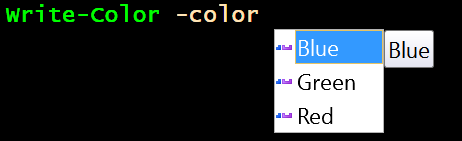
With this function in memory, let's run these commands and see what happens:
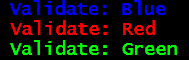
That worked!
What if we used a color that's not in the group specified?

The command will also auto-complete the options for you in the console if you specify -color and then hit tab.

Limitations
There are some limitations when doing this.
- If you set a default value to one outside the array of options, it will work as it only checks incoming input
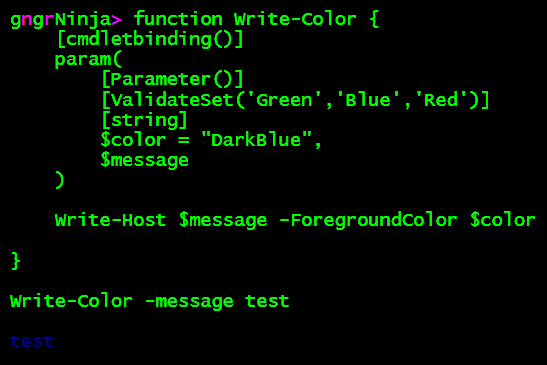 Hard to see, but it worked even though DarkBlue isn't in the set above!
- You're unable to generate your own error messages based on what happens in the function
- This is fine, though, as you can wrap this up in a Try/Catch outside the function!
Error message after running:

Instead of using Write-Host, and merely showing the error, you'd want to have code in place that takes action based on the specific event.
Wrap Up
That's about it for using ValidateSet! It can really come in handy, and save you time when writing out your scripts.
Do you use ValidateSet? Leave a comment, and let me know how you use it. I always love hearing different use cases.
Comments
No comments yet. Be the first!